Calculate your Cash-out
Estimate your leave cash-out using the calculator below after reviewing eligibility and maximums for your employment type.
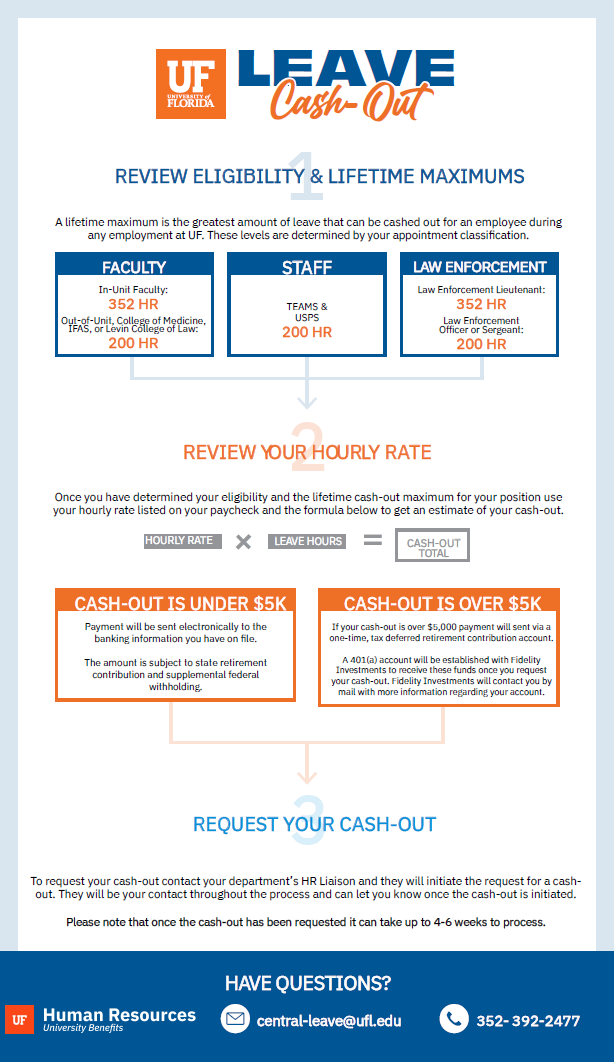
1. Review Eligibility & Lifetime Maximums
- College of Medicine, IFAS, Levin College of Law, or Out-of-Unit: Lifetime maximum cash-out is 200 hours of vacation time.
- In-Unit Faculty: Lifetime maximum cash-out is 352 hours of vacation time. If hired before 4/1/2010 with 10 or more years of creditable service, you can also cash-out 1/4 of your sick leave, up to 480 hours.
- TEAMS: Lifetime maximum cash-out is 200 hours of vacation time.
- Law Enforcement Officer or Sergeant: Lifetime maximum cash-out is 200 hours of vacation time.
- Law Enforcement Lieutenant: Lifetime maximum cash-out is 352 hours of vacation time.
- For Law Enforcement Officers, Sergeants, or Lieutenants hired before 1/1/2017 and retiring, you can also cash-out 1/4 of your sick leave, up to 480 hours.
A lifetime maximum is the greatest amount of leave that can be cashed out for an employee during any employment at UF. These levels are determined by your appointment classification.
If you received a prior cash-out upon separation from UF employment, it may impact your current eligibility. Contact central-leave@ufl.edu to determine your prior cash-out amount.
Note: Upon separation, all available hours up to the lifetime maximum must be cashed out.
2. Reviewing Your Hourly Rate
- To estimate your cash-out, use your hourly rate listed on your paycheck in the calculator below.
- To review your hourly rate, visit myUFL and navigate to My Self Service > Payroll and Compensation > View Paycheck.
- College of Medicine faculty funded by Academic Enrichment Funds (AEF) should combine all hourly rates when estimating their cash-out. Contact your HR Liaison if unsure about AEF funding.
Leave Cash-out Calculator
Per University of Florida regulation, the method and timing of receiving the cash-out will depend upon the total amount of the payment.
Your estimated cash-out is $0.00
If your cash-out is under $5,000 payment will be sent electronically to the banking information you have on file.
- An employee may make changes their banking information by visiting myUFL and then navigating to My Self Service > Payroll and Compensation > Direct Deposit
- The amount is subject to state retirement contribution and applicable payroll taxes.
If your cash-out is $5,000 or greater, payment will sent via a one-time, tax deferred retirement contribution account.
- This policy is outlined in the Special Pay Plan.
- A 401(a) account will be established with Fidelity Investments to receive these funds once you request your cash-out. Fidelity Investments will contact you by mail with more information regarding your account.
- Through the Special Pay Plan employees may invest, rollover, or distribute these funds.
- If the estimated value of your cash-out is greater than the current Calendar Year Contribution Limit and you wish to consider a deferment option, please contact UFHR Benefits at benefits@ufl.edu.
- Visit myUFL to make sure your mailing address is current since this is the information that will be provided to Fidelity when establishing the account. If you need to update this information after requesting the cash-out please contact Fidelity Investments directly.
3. Request Your Cash-out or Confirm Cash-out Status
If you’re eligible for a leave cash-out, your department can submit the request on your behalf during the pay period following your last day of employment. If you have questions about the cash-out process or want to check the status of your leave cash-out, please reach out to your department’s HR team or HR Liaison. Processing may take 4 to 6 weeks after submission eligibility is met.
Contacting Fidelity Investments
If your cash-out was $5,000 or greater and distributed to a Fidelity Investments account, you may invest, roll over, or distribute these funds. Contact Fidelity Investments directly with any questions through their UF contact portal.
Fidelity Investments – UF Contact Portal
Cash-out Flow Chart
Need Help?
Please contact UF Central Leave at (352) 392-2477 or email us at central-leave@ufl.edu.